Every movement a CNC machine makes starts with a simple set of instructions called G-code. Without it, computer-controlled machining wouldn’t exist. Whether you’re new to CNC or want a refresher, understanding G-code helps you troubleshoot problems and communicate better with machinists. This guide explains what G-code is in CNC programming, how it works, and why it remains the backbone of modern manufacturing.
What Is G-Code?
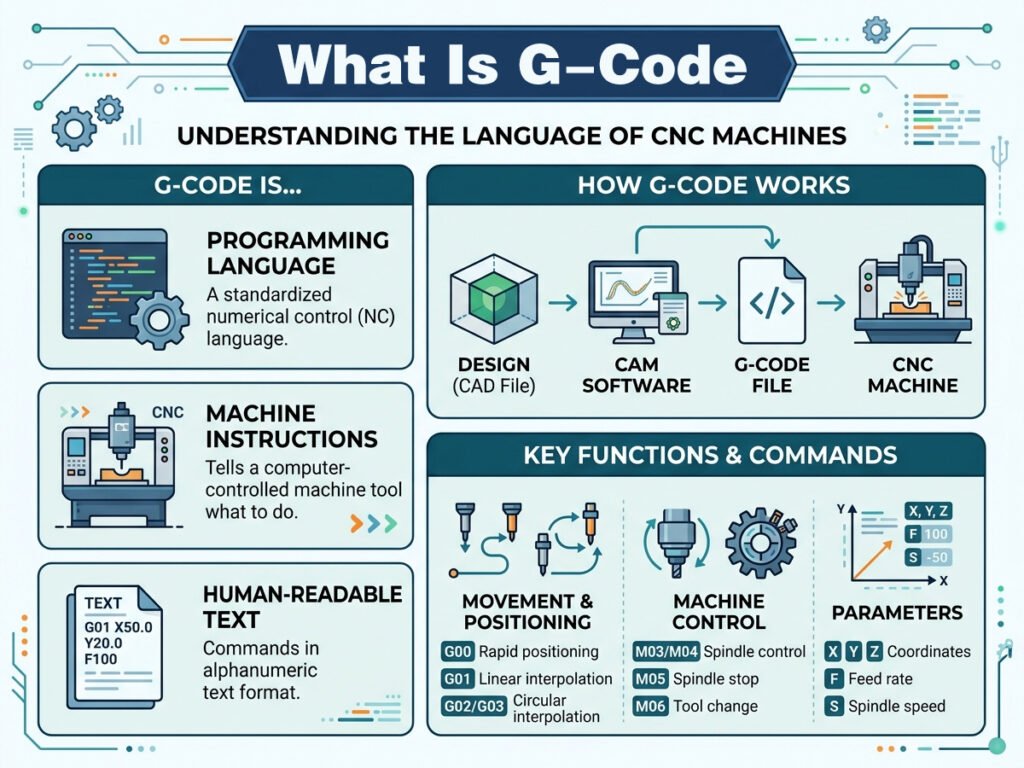
G-code is a programming language that tells CNC machines how to move. It controls the position, speed, and direction of cutting tools during the machining process.
The Origin of the Name
The “G” stands for “geometric,” reflecting how these codes define geometric movements like straight lines, curves, and arcs. Each G-code command represents a specific instruction the machine must follow.
Why G-Code Is Universal
Most CNC machines, regardless of brand, use some variation of G-code. This standardization allows programmers and machinists to work across different equipment with minimal retraining.
How G-Code Works in CNC Programming
G-code instructions are read line by line by the CNC controller. Each line contains a command that directs the machine’s movement or function.
Basic Structure of a G-Code Command
A typical G-code line includes a letter address followed by a number, such as G01 or G02. The letter identifies the command type, while the number specifies the exact action.
How the Machine Interprets Commands
Once the CNC controller reads a line, it converts the instruction into signals sent to servo motors. These motors then move the machine’s axes precisely according to the programmed path.
Common G-Code Commands Explained
G00: Rapid Positioning
This command moves the tool quickly to a specified location without cutting. It’s typically used for repositioning between operations.
G01: Linear Interpolation
G01 moves the tool in a straight line at a controlled feed rate while cutting material. This is one of the most frequently used commands in machining.
G02 and G03: Circular Interpolation
These commands create circular movements. G02 moves clockwise, while G03 moves counterclockwise, both used for cutting arcs and curves.
G17, G18, G19: Plane Selection
These codes define which plane the machine operates in — XY, XZ, or YZ — which is essential for accurate multi-axis machining.
G20 and G21: Unit Selection
G20 sets the machine to use inches, while G21 switches to metric units. Choosing the correct unit prevents costly measurement errors.
G28: Return to Home Position
This command sends the machine back to its reference or “home” position, often used at the start or end of a program.
Understanding M-Code Alongside G-Code
While G-code controls movement, M-code manages auxiliary machine functions. Together, they form a complete programming system.
Common M-Code Examples
M03 – Starts spindle rotation clockwise
M05 – Stops spindle rotation
M06 – Initiates a tool change
M08 – Turns on coolant flow
M30 – Ends the program and resets the machine
Why Both Codes Are Necessary
G-code handles precise movement, while M-code manages supporting operations like spindle control and coolant activation. Without both working together, the machining process wouldn’t function properly.
How G-Code Is Generated
Manual Programming
Experienced machinists sometimes write G-code manually for simple parts. This method requires strong technical knowledge but offers precise control over every movement.
CAM Software Generation
For complex parts, CAM (Computer-Aided Manufacturing) software automatically generates G-code based on a CAD design. This method is faster and reduces the risk of manual errors.
Reading and Interpreting a G-Code Program
Program Structure
A typical G-code program starts with setup commands, followed by a sequence of movement and cutting instructions, and ends with a program stop command.
Line-by-Line Breakdown
Each line in a program represents a single instruction. For example, a line might specify tool position, feed rate, and spindle speed all within one command sequence.
Why G-Code Is Essential for CNC Automation
Precision and Repeatability
G-code allows machines to execute the exact same instructions repeatedly, ensuring consistent quality across large production runs.
Reduced Manual Labor
Because the machine follows programmed instructions automatically, operators don’t need to manually guide the cutting tool during production.
Faster Production Times
Once a G-code program is created and tested, it can run multiple times without reprogramming, significantly speeding up manufacturing for repeat orders.
Common Challenges When Working With G-Code
Syntax Errors
Even small mistakes, like a missing decimal point or incorrect command sequence, can cause machining errors or damage to the workpiece.
Machine-Specific Variations
While G-code is fairly standardized, some CNC machine manufacturers use slightly different command sets. Therefore, programmers must understand their specific machine’s requirements.
Debugging Complex Programs
For intricate parts with thousands of lines of code, identifying and fixing errors can be time-consuming without proper simulation tools.
Best Practices for Working With G-Code
Always Simulate Before Running
Running a simulation helps catch errors before they affect real material, saving both time and resources.
Keep Programs Organized
Adding comments within the code helps operators understand each section, making troubleshooting and future edits much easier.
Double-Check Units and Tool Offsets
Confirming correct units and tool offsets before running a program prevents costly mistakes during production.
Regularly Update Your Knowledge
Since machine capabilities and software evolve, staying updated on new G-code commands and best practices improves overall efficiency.
The Future of G-Code in CNC Programming
Integration With AI-Assisted Programming
Newer CAM systems are beginning to use artificial intelligence to optimize G-code automatically, improving efficiency and reducing programming time.
Simplified Programming Interfaces
Some modern CNC controllers now offer conversational programming, allowing operators to input instructions through simplified menus rather than writing raw G-code manually.
Final Thoughts
G-code remains the foundation of CNC programming, translating digital designs into precise machine movements. From basic commands like G00 and G01 to more advanced circular interpolation codes, understanding G-code helps operators troubleshoot issues, optimize production, and maintain consistent quality. As CNC technology continues to evolve, G-code will remain a critical skill for anyone working in modern manufacturing.
One Response